
Comparison · Mac disk analyzers
Looking for a DaisyDisk Alternative?
DaisyDisk is one of the best-known disk analyzers on the Mac, and for many people it is the right tool. If you are here, you may want a different workflow, a different price model, or an answer to a different question. This page sets out where Diskuse Me differs, and where DaisyDisk is the better choice.
Where Diskuse Me takes a different route
Both apps scan a disk and draw a map you can drill into. The differences are in what happens around the map.
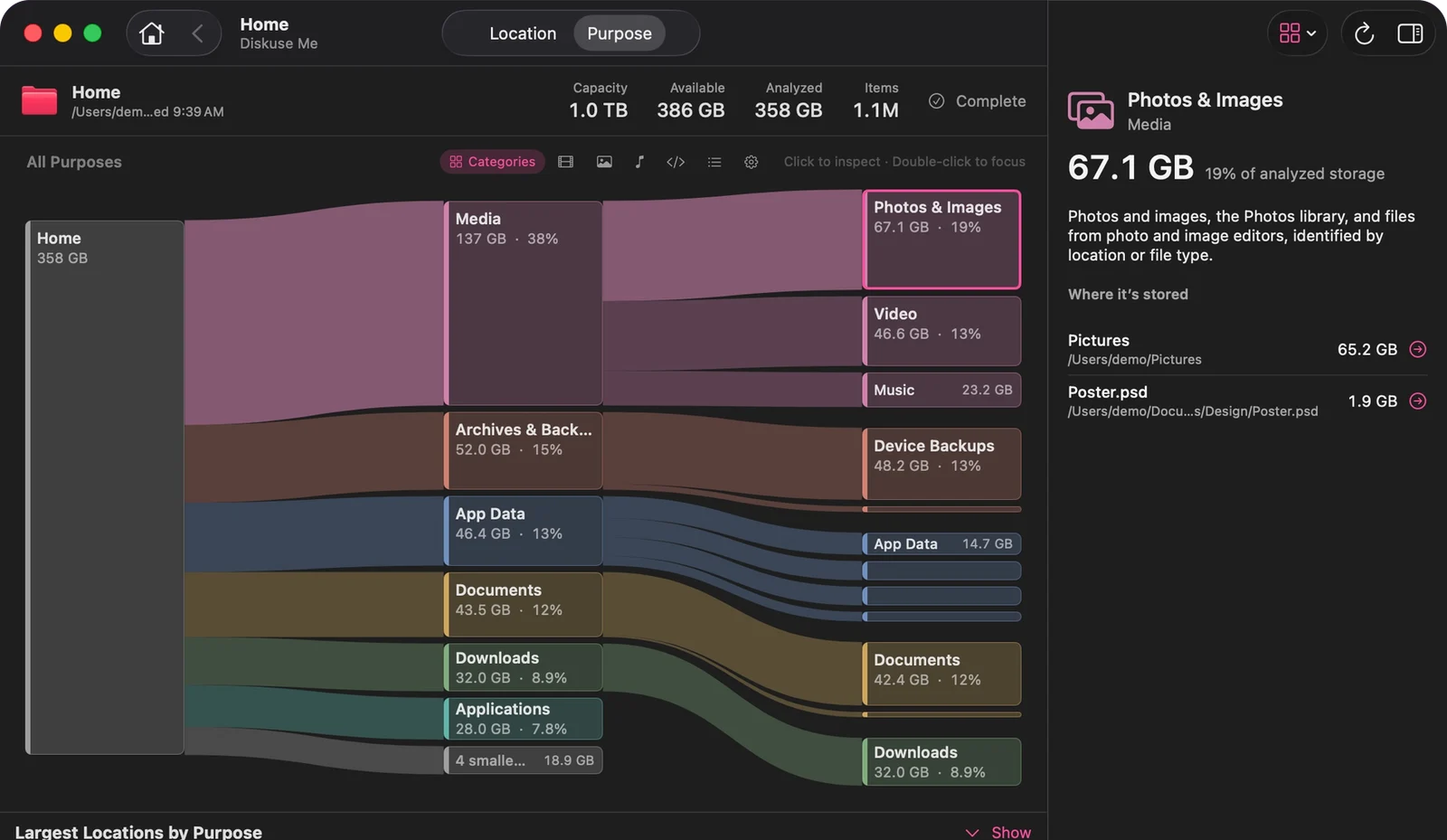
- Location and Purpose. Besides the real folder hierarchy, Diskuse Me regroups the same scan by what the data is for, and recognizes common storage such as Xcode, Docker, Unity, package-manager caches and local AI models, with a plain-language explanation. Unrecognized data stays under Other.
- History. Scans are kept per location and compared, so the map can highlight what grew since the last one. That is a comparison of scans you ran, not background monitoring.
- Inspect, don’t delete. Diskuse Me is read-only by design. Go to Folder reveals an item in Finder; there is nothing in the app that removes files.
- A different interface. A Sankey-style flow map in which width is size, with an inspector, a Largest Items list and search beside it.
Side by side
Competitor entries below come from DaisyDisk’s own website. “Not advertised” means we found no mention on the homepage, not that the feature doesn’t exist.
| DaisyDisk | Diskuse Me | |
|---|---|---|
| Main view | Interactive circular map | Flow (Sankey-style) map, with Largest Items list and inspector |
| Grouping by purpose | Not advertised | Yes: Purpose view with recognized apps and data |
| Scan history and growth | Not advertised | Yes: compare with the previous scan, highlight Recent Growth; longer history in Diskuse Me+ |
| Deleting from the app | Yes. You choose what to delete; system files are safeguarded | No. Read-only; Go to Folder opens Finder |
| Cloud services | Can connect Dropbox, Google Drive, OneDrive and Box | No. Shows what is only in iCloud for scanned iCloud content, without downloading it |
| Restricted files | Administrator scan reveals files unreachable in regular mode | Flags what it couldn’t read as unreadable; Full Disk Access may give a more complete scan |
| macOS requirement | macOS 10.13 or newer | macOS 15 or later |
| Price model | One-time license, with a free trial download | Free to download; Diskuse Me+ is an optional one-time In-App Purchase |
Sources: daisydiskapp.com and Diskuse Me’s Free vs Plus page, checked October 2026. Check the vendors’ sites for current prices and requirements.
When DaisyDisk is probably the better choice
- You want to delete files from inside the analyzer, and you are comfortable making those calls.
- You need to scan Dropbox, Google Drive, OneDrive or Box storage.
- Your Mac runs a macOS version older than 15.
- You want the quickest visual overview, and what changed since last time matters less to you.
When Diskuse Me is worth trying
- You want to know what a folder is, not only how big it is, particularly with developer or app data.
- You want to see what has grown since the last time you looked.
- You prefer a tool that stays read-only and leaves deletion to you and Finder.
- You like to check the numbers: capacity, available and analyzed size, with unreadable areas flagged.
Neither tool is “better” in the abstract. They are built around different questions. For the category as a whole, see what a Mac disk space analyzer should do; for another well-known option, the GrandPerspective comparison.
Try Diskuse Me
Location, Purpose and history in a native, read-only app. See whether the workflow fits your problem.
Download on theMac App StoreFree to download · Diskuse Me+ is an optional one-time upgrade · macOS 15 or later